Is There a Life360 for Car Guys? Meet AutoLNK Private Server
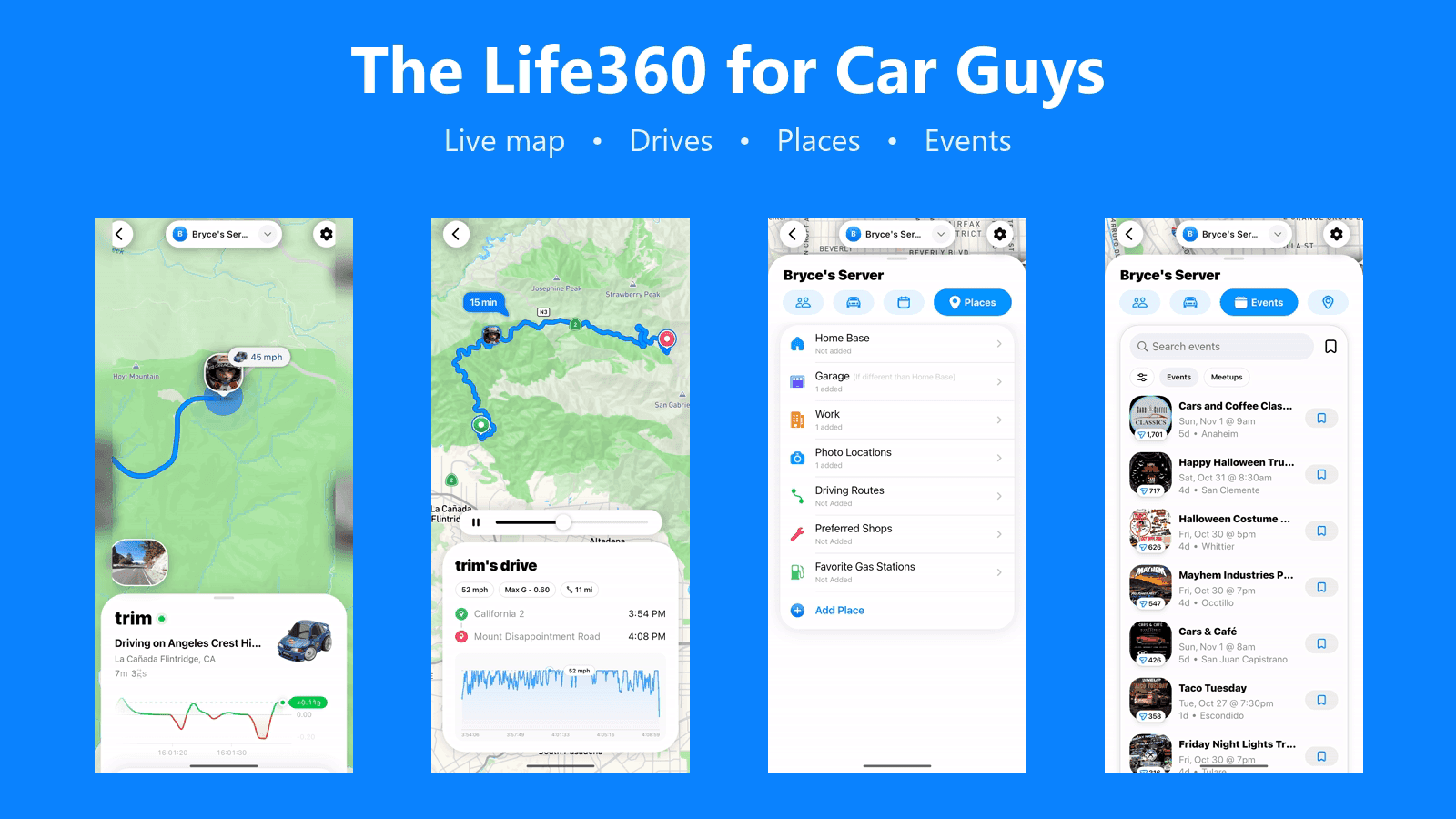
Yes, there is a Life360 for car guys: AutoLNK's Private Server. It works like Life360, but it is built for you and your car friends instead of families. Your group gets a private live map, shared places, saved routes, shared drives, and the car meets you are all going to, in one place inside the AutoLNK app.
Quick answers:
- What is a Private Server? A private group inside AutoLNK where your friends can see each other on a live map, chat, share places and routes, and plan meets together.
- Is it free? Yes. Private Servers are free on iOS and Android.
- Who can see my location? Only members of your Private Server, and you choose how much they see with one slider, from More precise to More private.
- How big can a Private Server be? Up to 99 members.
- Does it notify the group? Yes. Members can get a notification when someone arrives at a shared place, arrives at or leaves home base, or shows up at an event the group saved.
What is an AutoLNK Private Server?
An AutoLNK Private Server is a private space inside AutoLNK built for car clubs, friend groups that cruise together, and teams that run events. Everyone in the server can see each other on a live map, talk in the server chat, and share the places, routes, drives, and events that matter to the group, all inside the AutoLNK app.
Most location sharing apps stop at a dot on a map, while AutoLNK built the Private Server around what car people actually do together, which is meeting up, driving together, and going to car events.
How is a Private Server different from Life360 or Find My?
Life360 and Find My are built for families and friends who want to know where each other are. They do that job well.
AutoLNK built the Private Server for car culture. The places you and your friends share are the shop, the meet spot, and the best photo locations, the routes you save are the canyon loops you drive every weekend, and the events you save are the car meets and shows you are all going to together. The Private Server connects directly to AutoLNK DriveShare, so when you and your friends head out together, everyone is already in the same group.
| AutoLNK Private Server | Life360 / Find My | |
|---|---|---|
| Live map of your group | Yes | Yes |
| Choose how precise your location is | Yes, four levels from More precise to More private | Varies by app |
| Shared places with arrival alerts | Yes | Yes, varies by app |
| Built for car friends and car clubs | Yes | No, built for families |
| Saved driving routes for the group | Yes | Not a core feature |
| Shared drives and drive history | Yes, if members choose to share | Not a core feature |
| Car meets and events saved to the group | Yes | No |
| Connects to group drives (DriveShare) | Yes | No |
Who can see my location?
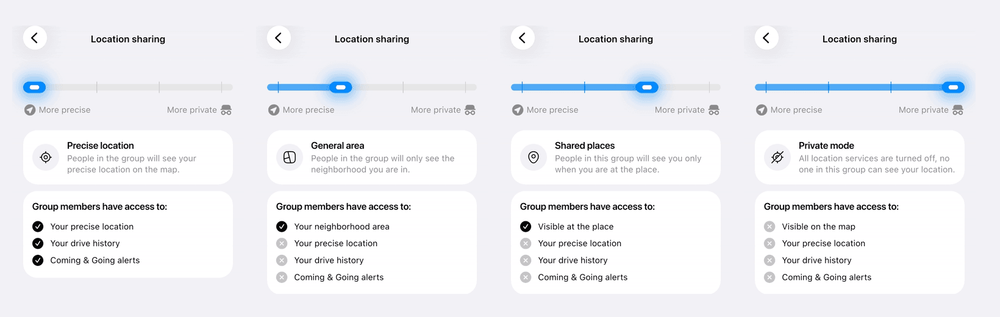
Only members of your Private Server, and only as much as you choose. Location sharing is one slider that goes from More precise to More private, with four levels:
- Precise location: your friends see your precise location on the map, your drive history, and Coming & Going alerts.
- General area: your friends only see the neighborhood you are in.
- Shared places: your friends only see you when you are at one of the group's shared places.
- Private mode: location sharing is turned off, and no one in the group can see your location.
Drive history and Coming & Going alerts are only shared on Precise location. You can move the slider at any time.
Your location is shared with the people in your server, not with the whole AutoLNK community.
How do shared places and home base work?
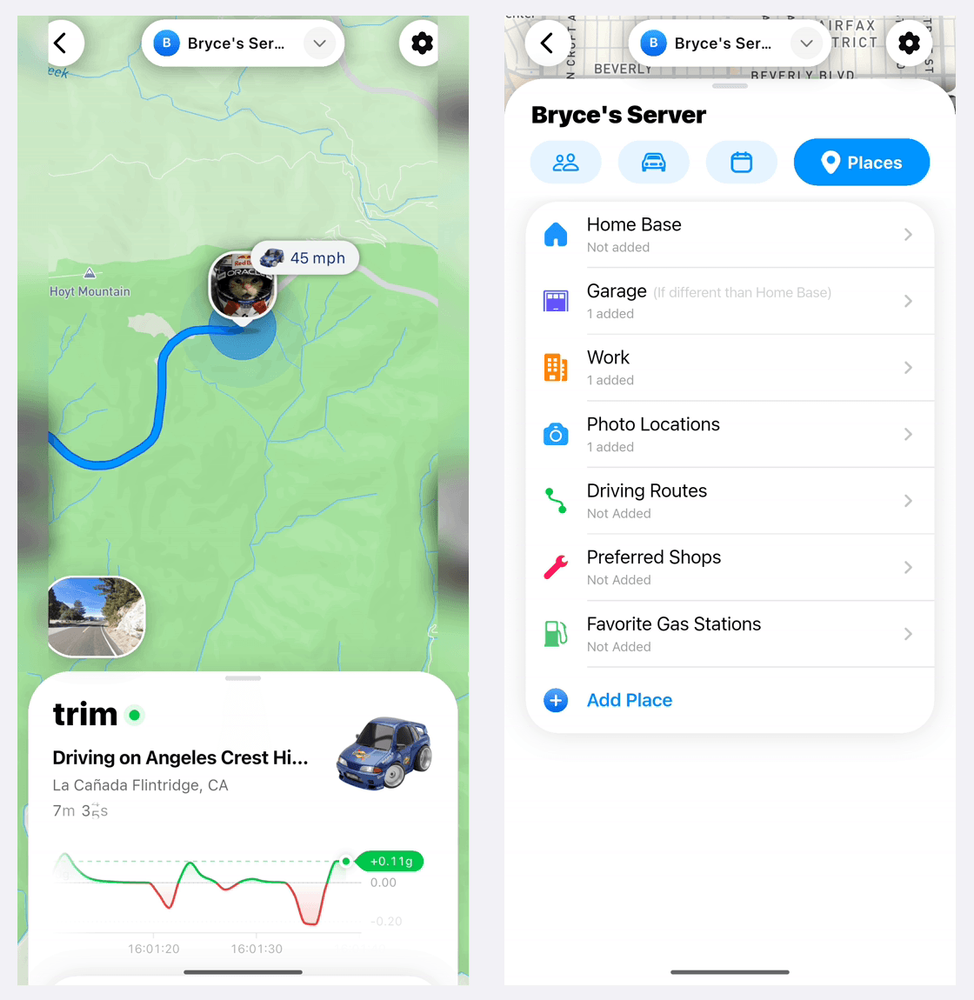
Shared places are the spots that matter to you and your friends, and the Places tab in every AutoLNK Private Server is built around them: Home Base, Garage, Work, Photo Locations, Driving Routes, Preferred Shops, and Favorite Gas Stations. Each place has its own radius so AutoLNK knows when someone pulls in.
Each member can also set a home base on AutoLNK, and when a member arrives at or leaves home base, your friends can get a notification, which is perfect for knowing when everyone is on the way to the meet.
When someone arrives at a shared place, members can get notified too. No more "where are you?" texts in the group chat. You choose which alerts you get for each server: places, members, events, and server chat.
Can my friends share routes and drives?
Yes. An AutoLNK Private Server keeps all of your friends' driving in one place:
- Saved routes: save the routes your friends drive, from a quick loop to a point to point run, so anyone in the server can pull them up.
- Shared drives: on Precise location, your friends can see your drive history and drive summaries. Move the slider toward More private and your drives stay private.
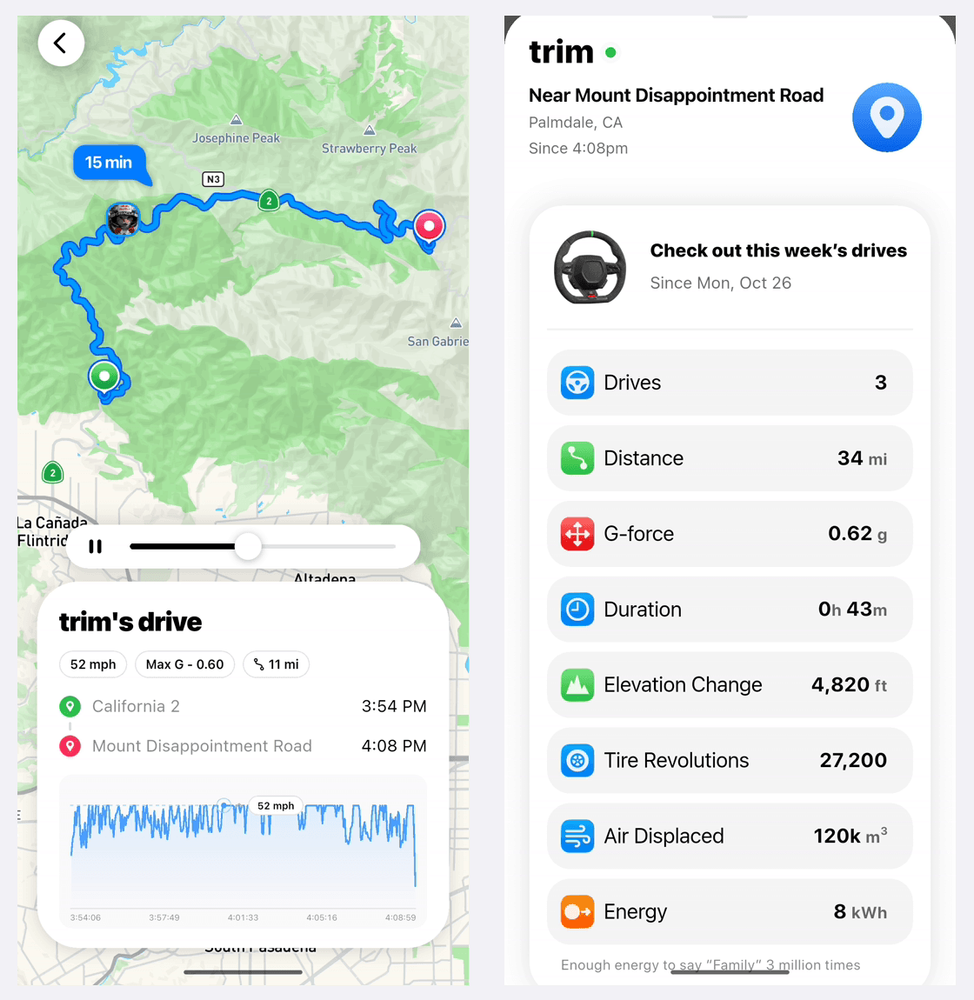
- Weekly drive stats: AutoLNK also adds up your drives every week, with distance, duration, tire revolutions, air displaced, and energy.
- Drive notifications: the group can get notified when a member finishes a drive.
How does a Private Server connect to car meets and DriveShare?
This is where the AutoLNK Private Server goes beyond a normal location sharing app. You and your friends can save car meets, shows, and Cars & Coffee events from AutoLNK straight to the server, so everyone knows what the group is going to this weekend, and when a member arrives at an event the group saved, your friends can get notified.
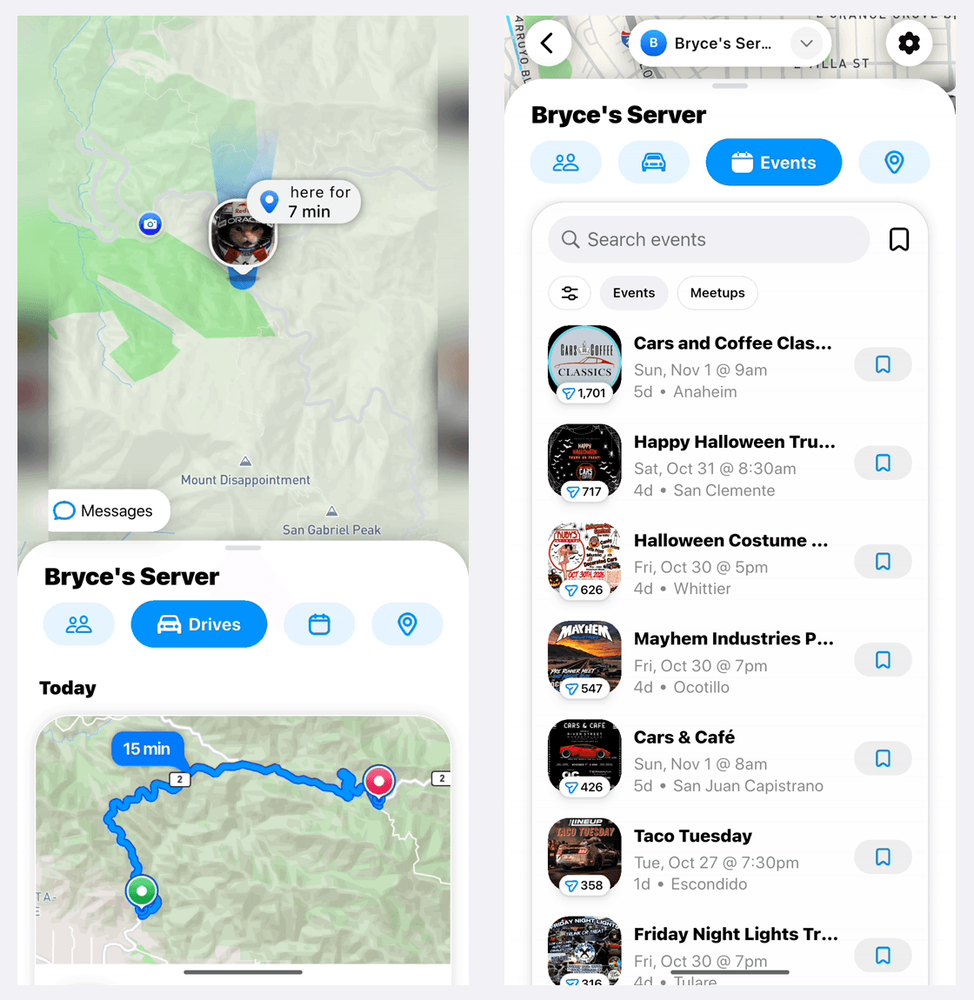
When it is time to drive, your friends can roll out together with DriveShare, AutoLNK's live group drive feature, with a shared route, live locations, and voice channels between cars. Find your next meet with the guide to the best app for car meets.
Is AutoLNK a good car club app?
Yes. AutoLNK is the best app for a car club because a Private Server gives the club one private home inside AutoLNK. Up to 99 members can join with your invite link, talk in the server chat, and see each other on the live map at the level of privacy each member chooses.
Everything a club runs on lives in the same place:
- Members: share one invite link, and people can also request to join.
- Meet spots: save your regular meet spots and shop as shared places, with alerts when members pull in.
- Club events: save the car meets and shows your club is going to, so every member sees the plan.
- Club drives: save your routes, and roll out together with DriveShare.
Most car clubs run on a group chat and an Instagram page, and an AutoLNK Private Server keeps the chat while adding the live map, places, events, and drives that a group chat cannot.
Who is a Private Server for?
- Car clubs that want one private space for members, meet spots, and club drives
- Friend groups who cruise together and want to know when everyone is on the way
- Teams that run meets, shows, or photo shoots and need to coordinate on the day
- Organizers who want their staff on one live map during an event
If your friends already live in a group chat, an AutoLNK Private Server gives that group chat a live map, shared places, routes, and events. For more on the community side of AutoLNK, see What Is the Best Automotive Social Media Platform?
How do I start a Private Server?
- Download AutoLNK on iOS or Android.
- Create a Private Server and share your invite link with your friends. People can also request to join.
- Pick your location sharing mode.
- Add your shared places and home base.
- Save your routes and the events you and your friends are going to.
FAQ
Is there a Life360 for car guys? Yes. AutoLNK's Private Server is the Life360 for car guys. It gives car clubs and friends a private live map with shared places, saved routes, shared drives, and the car events the group is going to, all connected to DriveShare for group drives.
What is the best app for a car club? AutoLNK. A Private Server gives your club one private place for members, chat, a live map, meet spots, club events, and club drives, free on iOS and Android.
Is AutoLNK's Private Server like Life360? Yes, in the sense that your group can see each other on a live map and get notified when someone arrives somewhere. The difference is that a Private Server is built for you and your car friends, with routes, drives, car meets, and group drives built in.
Is the Private Server free? Yes. Private Servers are free on iOS and Android.
How many people can join a Private Server? Up to 99 members per Private Server.
Can I hide my exact location? Yes. You can share your precise location, only your general area, only when you are at the group's shared places, or turn on Private mode and share nothing at all.
Will my friends know when I arrive? Members can get notified when someone arrives at a shared place, arrives at or leaves home base, or arrives at an event the group saved.
Can I share my drives with the group? Yes. On Precise location, your friends can see your drive history and drive summaries. On the more private levels, your drive history is not shared.
Does it work with DriveShare? Yes. Your friends can plan and save events in the Private Server, then drive there together with DriveShare.